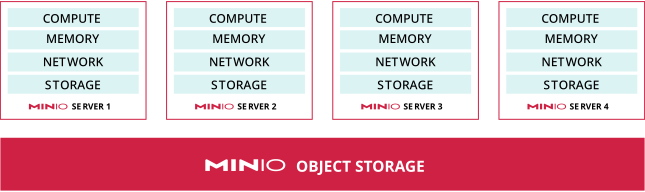
A MinIO deployment consists of a set of storage and compute resources running one or more minio server nodes that together act as a single object storage repository.
A standalone instance of MinIO consists of a single Server Pool with a single minio server node. Standalone instances are best suited for initial development and evaluation.
A MinIO deployment can run directly on a physical device in a bare metal or non-virtualized infrastructure. Or, MinIO might run within a virtual machine on a cloud service, such as using Docker, Podman, or Kubernetes. MinIO can run locally, on a private cloud, or in any of the many public clouds available on the market.
The specific way you design, architect, and build your system is called the system’s topology.
For example, a single container with two or more mounted volumes.
Multi Node Multi Drive, multiple MinIO servers with multiple mounted drives or volumes for data
For Baremetal infrastructure, you can install and manage distributed MinIO deployments using Ansible, Terraform, or manual processes
For Kubernetes infrastructure, use the MinIO Operator to manage and deploy distributed MinIO Tenants.
How does a distributed MinIO deployment work?
A distributed deployment makes use of the resources of more than one physical or virtual machine’s compute and storage resources. In modern situations, this often means running MinIO in a private or public cloud environment, such as with Amazon Web Services, the Google Cloud Platform, Microsoft’s Azure platform, or many others.
How does MinIO manage multiple virtual or physical servers?
While testing MinIO may only involve a single drive on a single computer, most production MinIO deployments use multiple compute and storage devices to create a high availability environment. A server pool is a set of minio server nodes that pool their drives and resources to support object storage write and retrieval requests.
MinIO supports adding one or more server pools to existing MinIO deployments for horizontal expansion. When MinIO has multiple server pools available, an individual object always writes to the same erasure set in the same server pool.
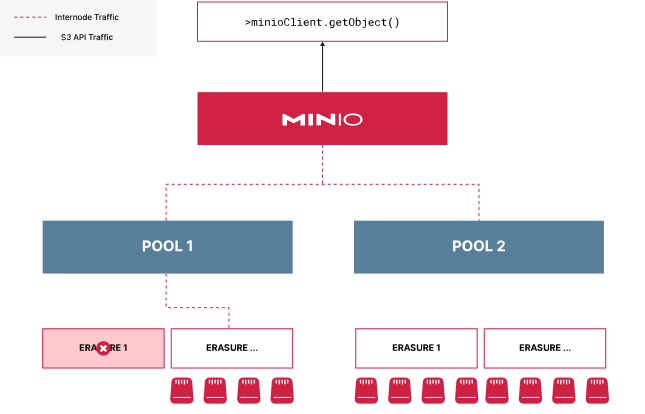
If one server pool goes down, MinIO halts I/O to all pools until the cluster resumes normal operations. You must restore the pool to working operation to resume I/O to the deployment. Objects written to other pools remain safe on disk while you perform repair operations.
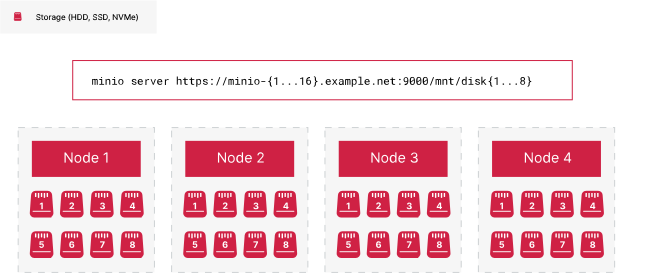
The HOSTNAME argument passed to the minio server command represents a Server Pool:
Consider the following example startup command, which creates a single Server Pool with 4 minio server nodes of 4 drives each for a total of 16 drives.
minio server https://minio{1...4}.example.net/mnt/disk{1...4}| Server Pool |
Starting server pools in the same minio server startup command enables awareness of all server pool peers.
How does MinIO link multiple server pools into a single MinIO cluster?
A cluster refers to an entire MinIO deployment consisting of one or more Server Pools.
Consider the command below that creates a cluster consisting of two Server Pools, each with 4 minio server nodes and 4 drives per node for a total of 32 drives.
minio server https://minio{1...4}.example.net/mnt/disk{1...4}\
https://minio{5...8}.example.net/mnt/disk{1...4}| Server Pool |
Each server pool has one or more erasure sets depending on the number of drives and nodes in the pool.
MinIO strongly recommends production clusters consist of a minimum of 4 minio server nodes in a Server Pool for proper high availability and durability guarantees.
Can I change the size of an existing MinIO deployment?
MinIO distributed deployments support expansion and decommissioning as functions to increase or decrease the available storage.
Expansion consists of adding one or more server pools to an existing deployment. Each server pool consists of dedicated nodes and storage that contribute to the overall capacity of the deployment. Once you create a server pool you cannot change its size, but you can add or remove capacity at any time by adding or decommissioning pools.
For deployments which have multiple server pools, you can decommission the older pools and migrate that data to the newer pools in the deployment. Once started, decommissioning cannot be stopped. MinIO intends decommissioning for use with removing older pools with aged hardware, and not as an operation performed regularly within any deployment.
Note
Maintain pool order when decommissioning and then adding
If you decommission one pool in a multiple pool deployment, you cannot use the same node sequence for a new pool. For example, consider a deployment with the following pools:
The MinIO Console graphical user interface for individual instances
How do I manage object distribution across a MinIO deployment?
MinIO optimizes storage of objects across available pools by writing new objects (that is, objects with no existing versions) to the server pool with the most free space compared total amount of free space on all available server pools. MinIO does not perform the costly action of rebalancing objects from older pools to newer pools. Instead, new objects typically route to the new pool as it has the most free space. As that pool fills, new write operations eventually balance out across all pools in the deployment. For more information on write preference calculation logic, see Writing Files below.
Rebalancing data across all pools after an expansion is an expensive operation that requires scanning the entire deployment and moving objects between pools. This may take a long time to complete depending on the amount of data to move.
Starting with MinIO Client version RELEASE.2022-11-07T23-47-39Z, you can manually initiate a rebalancing operation across all server pools using mc admin rebalance.
Rebalancing does not block ongoing operations and runs in parallel to all other I/O. This can result in reduced performance of regular operations. Consider scheduling rebalancing operations during non-peak periods to avoid impacting production workloads. You can start and stop rebalancing at any time
How do I upload objects to MinIO?
You can use any S3-compatible SDK to upload objects to a MinIO deployment. Each SDK performs the equivalent of a PUT operation which transmits the object to MinIO for storage.
MinIO also implements support for multipart uploads, where clients can split an object into multiple parts for better throughput and reliability of transmission. MinIO reassembles these parts until it has a completed object, then stores that object at the specified path.
How does MinIO provide availability, redundancy, and reliability?
MinIO Uses Erasure Coding for Data Redundancy and Reliability
MinIO Erasure Coding is a data redundancy and availability feature that allows MinIO deployments with multiple drives to automatically reconstruct objects on-the-fly despite the loss of multiple drives or nodes in the cluster. Erasure Coding provides object-level healing with significantly less overhead than adjacent technologies such as RAID or replication.
MinIO Implements Bit Rot Healing to Protect Data At Rest
Bit rot is the random, silent corruption to data that can happen on any storage device. Bit rot corruption is not prompted by any activity from a user, nor does the system’s operating system alone have awareness of the corruption to notify a user or administrator about a change to the data.
Some common reasons for bit rot include:
ageing drives
current spikes
bugs in drive firmware
phantom writes
misdirected reads/writes
driver errors
accidental overwrites
MinIO uses a hashing algorithm to confirm the integrity of an object. This algorithm automatically applies at the time of any GET and HEAD operations for an object. For objects in a versioned bucket, a PUT operation can also trigger healing if MinIO identifies version inconsistencies. If an object becomes corrupted by bit rot, MinIO can automatically heal the object depending on the availability of parity shards for the object.
MinIO can also perform bit rot checks and healing using the MinIO Scanner. However, scanner bit rot checking is off by default. Active bit rot healing during scanner has a high performance impact in comparison to the low probability of bit rot affecting multiple object shards distributed across multiple drives and nodes. The automatic checks during normal operations is generally sufficient for bit rot, and MinIO does not recommend using the scanner for this type of health check.
MinIO Distributes Data Across Erasure Sets for High Availability and Resiliency
An erasure set is a group of multiple drives that supports MinIO Erasure Coding. Erasure Coding provides high availability, reliability, and redundancy of data stored on a MinIO deployment.
MinIO divides objects into chunks — called shards — and evenly distributes them among each drive in the Erasure Set. MinIO can continue seamlessly serving read and write requests despite the loss of any single drive. At the highest redundancy levels, MinIO can serve read requests with minimal performance impact despite the loss of up to half (N/2) of the total drives in the deployment.
MinIO calculates the size and number of Erasure Sets in a Server Pool based on the total number of drives in the set and the number of minio servers in the set. See Erasure Coding Basics for more information.
MinIO Automatically Heals Corrupt or Missing Data On-the-fly
Healing is MinIO’s ability to restore data after some event causes data loss. Data loss can come from bit rot, drive loss, or node loss.
Erasure coding provides continued read and write access if an object has been partially lost.
Note
Exclusive access to drives
MinIO requiresexclusive access to the drives or volumes provided for object storage. No other processes, software, scripts, or persons should perform any actions directly on the drives or volumes provided to MinIO or the objects or files MinIO places on them.
Unless directed by MinIO Engineering, do not use scripts or tools to directly modify, delete, or move any of the data shards, parity shards, or metadata files on the provided drives, including from one drive or node to another. Such operations are very likely to result in widespread corruption and data loss beyond MinIO’s ability to heal.
MinIO Writes Data Protection at the Object Level with Parity
A MinIO deployment with multiple drives divides the available drives into data drives and parity drives. MinIO Erasure Coding adds additional hashing information about the contents of an object to the parity drives when writing an object. MinIO uses the parity information to confirm the integrity of an object and, if necessary, to restore a lost, missing, or corrupted object shard on a given drive or set of drives.
MinIO can tolerate losing up to the total number of drives equal to the number of parity devices available in the erasure set while still providing full access to an object.
Deliver Read and Write Functions with Quorum
A minimum number of drives that must be available to perform a task. MinIO has one quorum for reading data and a separate quorum for writing data.
Typically, MinIO requires a higher number of available drives to maintain the ability to write objects than what is required to read objects.
1 - Deployment Architecture
Silo production deployment architecture and topology
This page provides an overview of MinIO deployment architectures from a production perspective. For information on specific hardware or software configurations, see:
A production MinIO deployment consists of at least 4 MinIO hosts with homogeneous storage and compute resources.
MinIO aggregates these resources together as a pool and presents itself as a single object storage service.
Each MinIO host in this pool has matching compute, storage, and network configurations
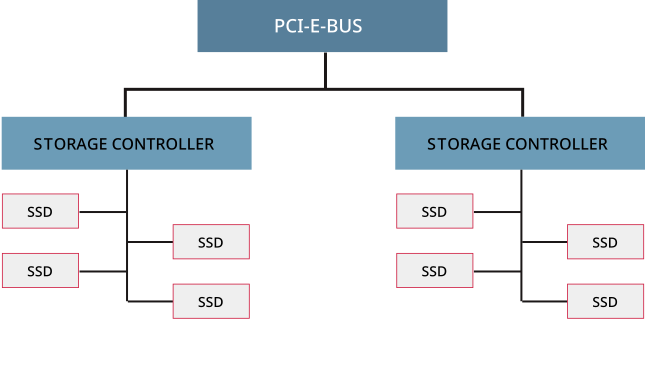
MinIO provides best performance when using locally-attached storage, such as NVMe or SSD drives attached to a PCI-E controller board on the host machine.
Storage controllers should present XFS-formatted drives in “Just a Bunch of Drives” (JBOD) configurations with no RAID, pooling, or other hardware/software resiliency layers. MinIO recommends against caching, either at the drive or the controller layer. Either type of caching can cause I/O spikes as the cache fills and clears, resulting in unpredictable performance.
Each SSD connects by SAS to a PCI-E-attached storage controller operating in HBA mode
MinIO automatically groups drives in the pool into erasure sets.
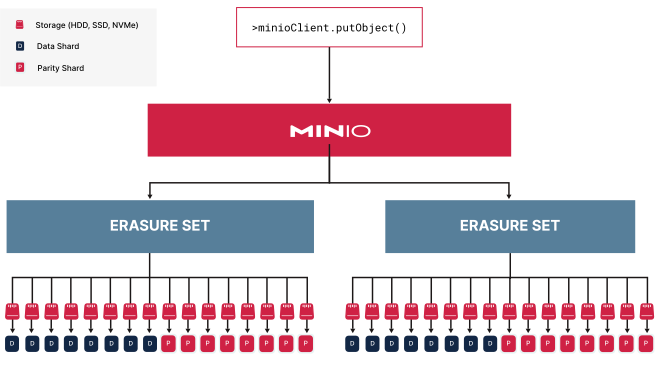
Erasure sets are the foundational component of MinIO availability and resiliency. MinIO stripes erasure sets symmetrically across the nodes in the pool to maintain even distribution of erasure set drives. MinIO then partitions objects into data and parity shards based on the deployment parity and distributes them across an erasure set.
With the maximum parity of EC:8, MinIO shards the object into 8 data and 8 parity blocks, distributing them across the drives in the erasure set.
All erasure sets in this pool have the same stripe size and shard distribution.
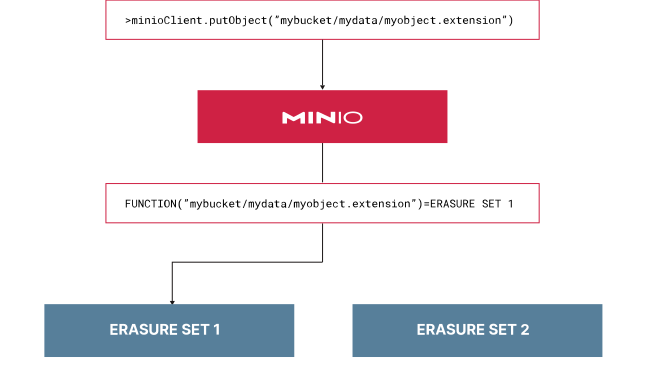
MinIO uses a deterministic hashing algorithm based on object name and path to select the erasure set for a given object.
For each unique object namespace BUCKET/PREFIX/[PREFIX/...]/OBJECT.EXTENSION, MinIO always selects the same erasure set for read/write operations. MinIO handles all routing within pools and erasure sets, making the select/read/write process entirely transparent to applications.
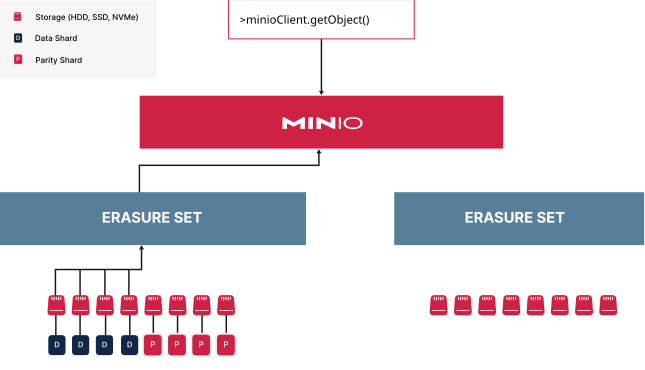
MinIO reconstructs objects from data or parity shards transparently before returning the object to the requesting client.
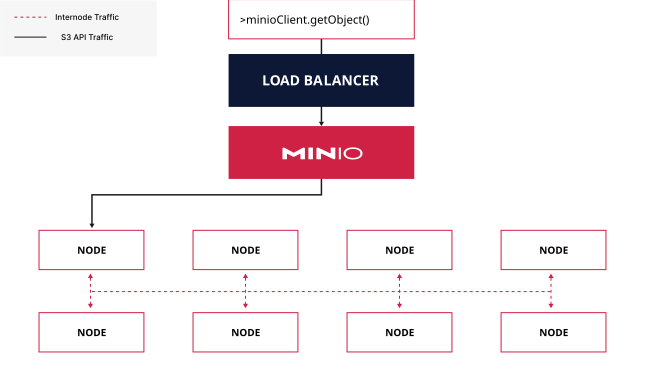
Each MinIO server has a complete picture of the distributed topology, such that an application can connect and direct operations against any node in the deployment.
The MinIO responding node automatically handles routing internal requests to other nodes in the deployment and returning the final response to the client.
Applications typically should not manage those connections, as any changes to the deployment topology would require application updates. Production environments should instead deploy a load balancer or similar network control plane component to manage connections to the MinIO deployment. For example, you can deploy an NGINX load balancer to perform “least connections” or “round robin” load balancing against the available nodes in the deployment.
The load balancer routes the request to any node in the deployment.
The receiving node handles any internode requests thereafter.
You can expand a MinIO deployment’s available storage through pool expansion.
Each pool consists of an independent group of nodes with their own erasure sets. MinIO must query each pool to determine the correct erasure set to which it directs read and write operations, such that each additional pool adds increased internode traffic per call. The pool which contains the correct erasure set then responds to the operation, remaining entirely transparent to the application.
If you modify the MinIO topology through pool expansion, you can update your applications by modifying the load balancer to include the new pool’s nodes. Applications can continue using the load balancer address for the MinIO deployment without any updates or modifications. This ensures even distribution of requests across all pools, while applications continue using the single load balancer URL for MinIO operations.
The PUT request requires checking each pool for the correct erasure set.
Once identified, MinIO partitions the object and distributes the data and parity shards across the appropriate set.
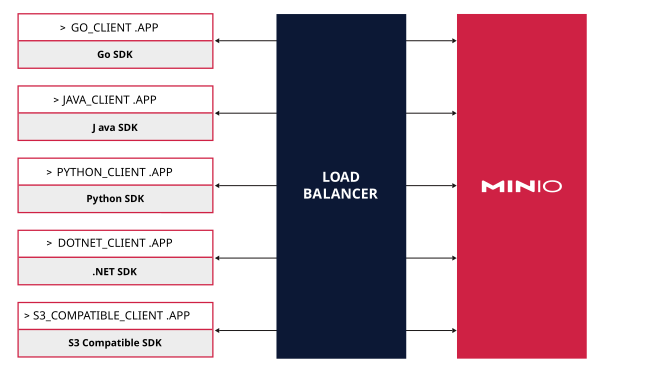
Client applications can use any S3-compatible SDK or library to interact with the MinIO deployment.
MinIO publishes its own SDK specifically intended for use with S3-compatible deployments.
Clients using a variety of S3-compatible SDKs can perform operations against the same MinIO deployment.
MinIO uses a strict implementation of the S3 API, including requiring clients to sign all operations using AWS Signature V4 or the legacy Signature V2. AWS signature calculation uses the client-provided headers, such that any modification to those headers by load balancers, proxies, security programs, or other components will result in signature mismatch errors and request failure. Ensure any such intermediate components support pass-through of unaltered headers from client to server.
While the S3 API uses HTTP methods like GET and POST for all operations, applications typically use an SDK for S3 operations. In particular, the complexity of signature calculation typically makes interfacing via curl or similar REST clients impractical. MinIO recommends using S3-compatible SDKs or libraries which perform the signature calculation automatically as part of operations.
Replicated MinIO Deployments
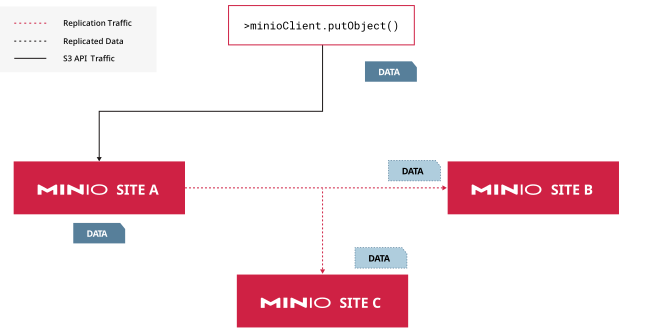
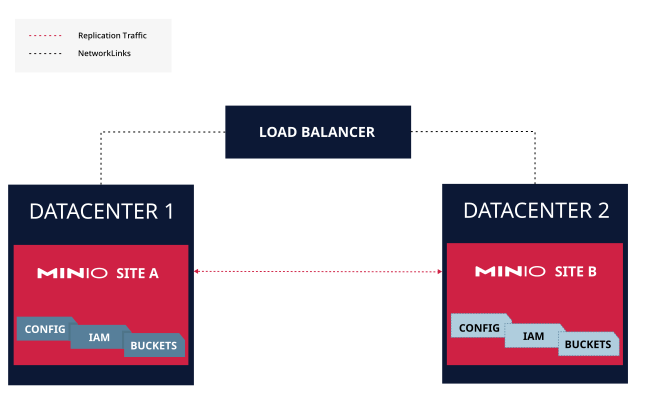
MinIO site replication provides support for synchronizing distinct independent deployments.
You can deploy peer sites in different racks, datacenters, or geographic regions to support functions like BC/DR or geo-local read/write performance in a globally distributed MinIO object store.
A MinIO multi-site deployment with three peers.
Write operations on one peer replicate to all other peers in the configuration automatically.
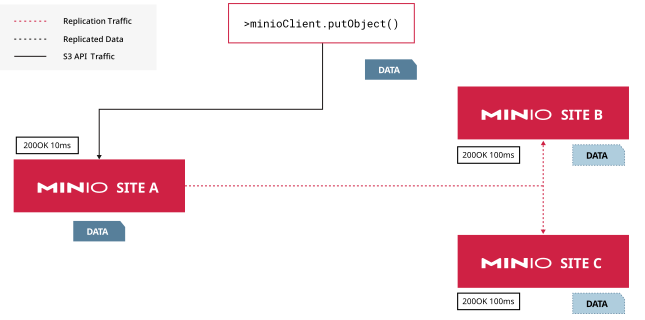
Replication performance primarily depends on the network latency between each peer site.
With geographically distributed peer sites, high latency between sites can result in significant replication lag. This can compound with workloads that are near or at the deployment’s overall performance capacity, as the replication process itself requires sufficient free I/O to synchronize objects.
In this peer configuration, the latency between Site A and its peer sites is 100ms.
The soonest the object fully synchronizes to all sites is at least 110ms.
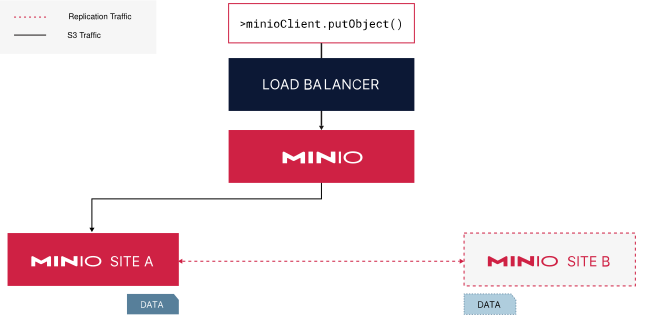
Deploying a global load balancer or similar network appliance with support for site-to-site failover protocols is critical to the functionality of multi-site deployments.
The load balancer should support a health probe/check setting to detect the failure of one site and automatically redirect applications to any remaining healthy peer.
The Load Balancer automatically routes client requests using configured logic (geo-local, latency, etc.).
Data written to one site automatically replicates to the other peer site.
The load balancer should meet the same requirements as single-site deployments regarding connection balancing and header preservation. MinIO replication handles transient failures by queuing objects for replication.
2 - Availability and Resiliency
Silo availability and resiliency in production environments
This page provides an overview of MinIO’s availability and resiliency design and features from a production perspective.
Note
Note
The contents of this page are intended as a best-effort guide to understanding MinIO’s intended design and philosophy behind availability and resiliency. It cannot replace the functionality of MinIO SUBNET, which allows for coordinating with MinIO Engineering when planning your MinIO deployments.
Community users can seek support on the MinIO Community Slack. Community Support is best-effort only and has no SLAs around responsiveness.
Distributed MinIO Deployments
MinIO implements erasure coding as the core component in providing availability and resiliency during drive or node-level failure events.
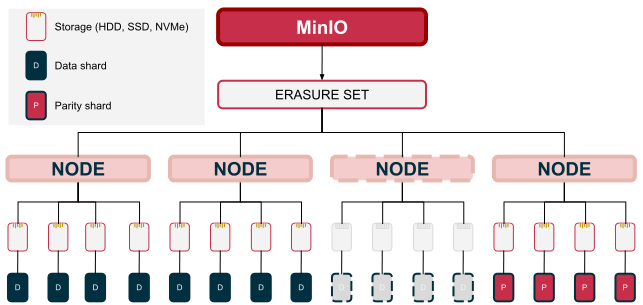
MinIO partitions each object into data and parity shards and distributes those shards across a single erasure set.
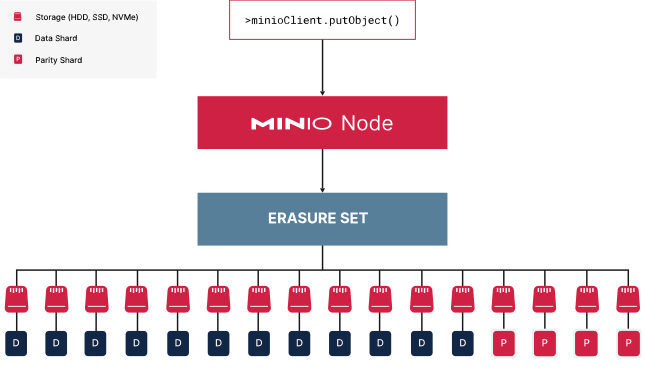
This small one-node deployment has 16 drives in one erasure set.
Assuming default parity of EC:4, MinIO partitions the object into 4 (four) parity shards and 12 (twelve) data shards.
MinIO distributes these shards evenly across each drive in the erasure set.
MinIO uses a deterministic algorithm to select the erasure set for a given object.
For each unique object namespace BUCKET/PREFIX/[PREFIX/...]/OBJECT.EXTENSION, MinIO always selects the same erasure set for read/write operations. This includes all versions of that same object.
MinIO calculates the destination erasure set using the full object namespace.
MinIO requires read and write quorum to perform read and write operations against an erasure set.
The quorum depends on the configured parity for the deployment. Read quorum always equals the configured parity, such that MinIO can perform read operations against any erasure set that has not lost more drives than parity.
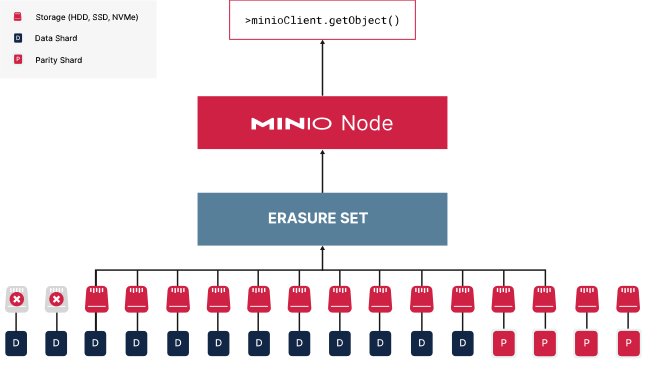
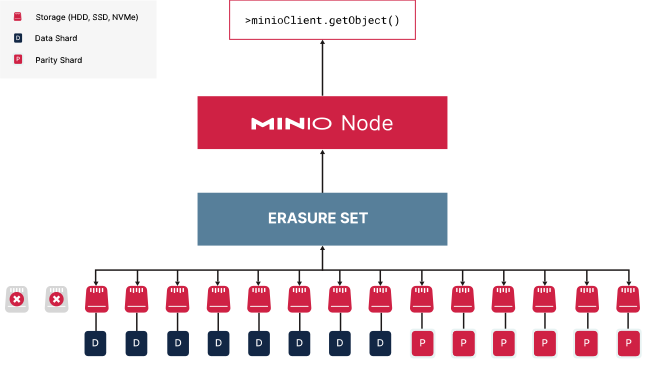
This node has two failed drives.
MinIO uses parity shards to replace the lost data shards automatically and serves the reconstructed object to the requesting client.
With the default parity of EC:4, the deployment can tolerate the loss of 4 (four) drives per erasure set and still serve read operations.
Write quorum depends on the configured parity and the size of the erasure set.
If parity is less than 1/2 (half) the number of erasure set drives, write quorum equals parity and functions similarly to read quorum.
MinIO automatically increases the parity of objects written to a degraded erasure set to ensure that object can meet the same SLA as objects in healthy erasure sets. The parity upgrade behavior provides an additional layer of risk mitigation, but cannot replace the long-term solution of repairing or replacing damaged drives to bring the erasure set back to full healthy status.
This node has two failed drives.
MinIO writes the object with an upgraded parity of EC:6 to ensure this object meets the same SLA as other objects.
With the default parity of EC:4, the deployment can tolerate the loss of 4 drives per erasure set and still serve write operations.
If parity equals 1/2 (half) the number of erasure set drives, write quorum equals parity + 1 (one) to avoid data inconsistency due to “split brain” scenarios.
For example, if exactly half the drives in the erasure set become isolated due to a network fault, MinIO would consider quorum lost as it cannot establish a N+1 group of drives for the write operation.
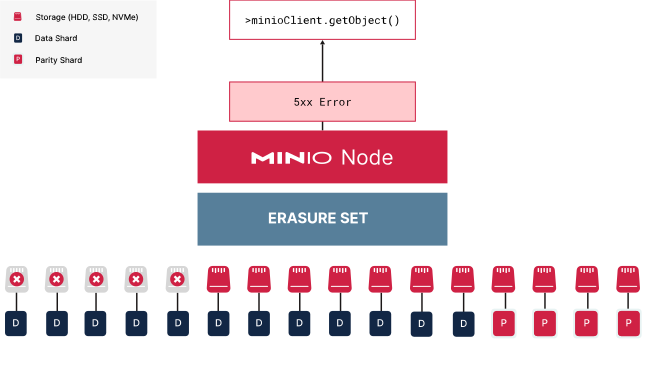
This node has 50% drive failure.
If parity is EC:8, this erasure set cannot meet write quorum and MinIO rejects write operations to that set.
Since the erasure set still maintains read quorum, read operations to existing objects can still succeed.
An erasure set which permanently loses more drives than the configured parity has suffered data loss.
For maximum parity configurations, the erasure set goes into “read only” mode if drive loss equals parity. For the maximum erasure set size of 16 and maximum parity of 8, this would require the loss of 9 drives for data loss to occur.
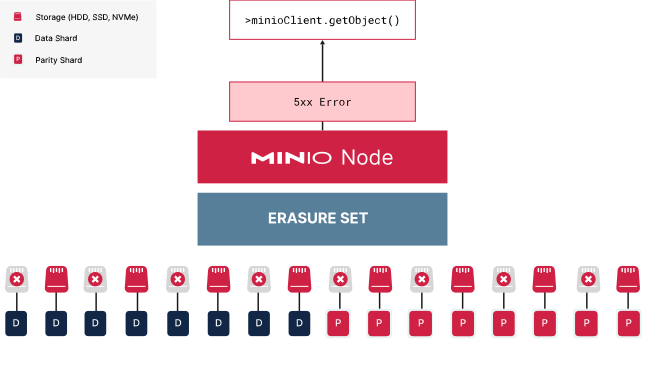
This erasure set has lost more drives than the configured parity of EC:4 and has therefore lost both read and write quorum.
MinIO cannot recover any data stored on this erasure set.
Transient or temporary drive failures, such as due to a failed storage controller or connecting hardware, may recover back to normal operational status within the erasure set.
MinIO further mitigates the risk of erasure set failure by “striping” erasure set drives symmetrically across each node in the pool.
MinIO automatically calculates the optimal erasure set size based on the number of nodes and drives, where the maximum set size is 16 (sixteen). It then selects one drive per node going across the pool for each erasure set, circling around if the erasure set stripe size is greater than the number of nodes. This topology provides resiliency to the loss of a single node, or even a storage controller on that node.
In this 16 x 8 deployment, MinIO would calculate 8 erasure sets of 16 drives each.
It allocates one drive per node across the available nodes to fill each erasure set.
If there were 8 nodes, MinIO would need to select 2 drives per node for each erasure set.
In the above topology, the pool has 8 erasure sets of 16 drives each striped across 16 nodes. Each node would have one drive allocated per erasure set. While losing one node would technically result in the loss of 8 drives, each erasure set would only lose one drive each. This maintains quorum despite the node downtime.
Each erasure set is independent of all others in the same pool.
If one erasure set becomes completely degraded, MinIO can still perform read/write operations on other erasure sets.
One pool has a degraded erasure set.
While MinIO can no longer serve read/write operations to that erasure set, it can continue to serve operations on healthy erasure sets in that pool.
However, the lost data may still impact workloads which rely on the assumption of 100% data availability. Furthermore, each erasure set is fully independent of the other such that you cannot restore data to a completely degraded erasure set using other erasure sets. You must use Site or Bucket replication to create a BC/DR-ready remote deployment for restoring lost data.
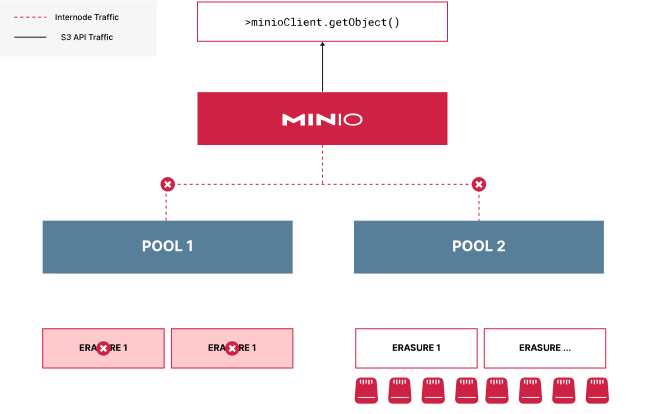
For multi-pool MinIO deployments, each pool requires at least one erasure set maintaining read/write quorum to continue performing operations.
If one pool loses all erasure sets, MinIO can no longer determine whether a given read/write operation would have routed to that pool. MinIO therefore stops all I/O to the deployment, even if other pools remain operational.
One pool in this deployment has completely failed.
MinIO can no longer determine which pool or erasure set to route I/O to.
Continued operations could produce an inconsistent state where an object and/or it’s versions reside in different erasure sets.
MinIO therefore halts all I/O in the deployment until the pool recovers.
To restore access to the deployment, administrators must restore the pool to normal operations. This may require formatting disks, replacing hardware, or replacing nodes depending on the severity of the failure. See Recover after Hardware Failure for more complete documentation.
Use replicated remotes to restore the lost data to the deployment. All data stored on the healthy pools remain safe on disk.
Note
Exclusive access to drives
MinIO requiresexclusive access to the drives or volumes provided for object storage. No other processes, software, scripts, or persons should perform any actions directly on the drives or volumes provided to MinIO or the objects or files MinIO places on them.
Unless directed by MinIO Engineering, do not use scripts or tools to directly modify, delete, or move any of the data shards, parity shards, or metadata files on the provided drives, including from one drive or node to another. Such operations are very likely to result in widespread corruption and data loss beyond MinIO’s ability to heal.
Replicated MinIO Deployments
MinIO implements site replication as the primary measure for ensuring Business Continuity and Disaster Recovery (BC/DR) in the case of both small and large scale data loss in a MinIO deployment.
Each peer site is deployed to an independent datacenter to provide protection from large-scale failure or disaster.
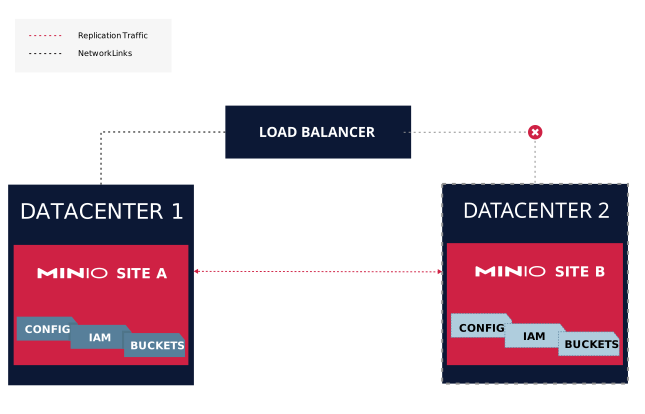
If one datacenter goes completely offline, clients can fail over to the other site.
MinIO replication can automatically heal a site that has partial or total data loss due to transient or sustained downtime.
Datacenter 2 was down and Site B requires resynchronization.
The Load Balancer handles routing operations to Site A in Datacenter 1.
Site A continuously replicates data to Site B.
Once all data synchronizes, you can restore normal connectivity to that site. Depending on the amount of replication lag, latency between sites and overall workload I/O, you may need to temporarily stop write operations to allow the sites to completely catch up.
If a peer site completely fails, you can remove that site from the configuration entirely. The load balancer configuration should also remove that site to avoid routing client requests to the offline site.
You can then restore the peer site, either after repairing the original hardware or replacing it entirely, by adding it back to the site replication configuration. MinIO automatically begins resynchronizing existing data while continuously replicating new data.
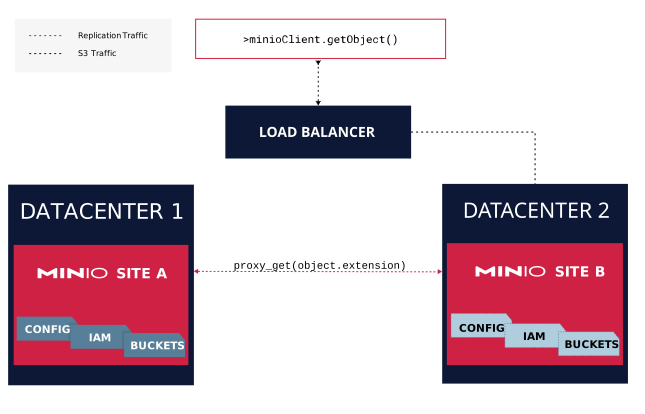
Sites can continue processing operations during resynchronization by proxying GET/HEAD requests to healthy peer sites
Site B does not have the requested object, possibly due to replication lag.
It proxies the GET request to Site A.
Site A returns the object, which Site B then returns to the requesting client.
The client receives the results from first peer site to return any version of the requested object.
PUT and DELETE operations synchronize using the regular replication process. LIST operations do not proxy and require clients to issue them exclusively against healthy peers.
MinIO implements Erasure Coding as a core component in providing data redundancy and availability. This page provides an introduction to MinIO Erasure Coding.
The diagrams and content in this section present a simplified view of MinIO erasure coding operations and are not intended to represent the complexities of MinIO’s full erasure coding implementation.
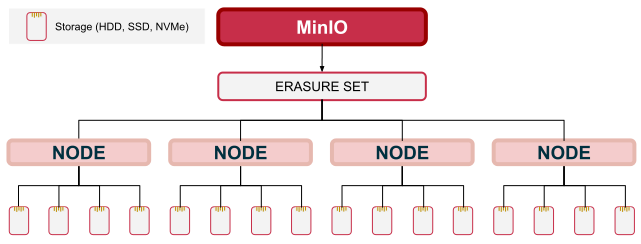
MinIO groups drives in each server pool into one or more Erasure Sets of the same size.
The above example deployment consists of 4 nodes with 4 drives each.
MinIO initializes with a single erasure set consisting of all 16 drives across all four nodes.
MinIO determines the optimal number and size of erasure sets when initializing a server pool. You cannot modify these settings after this initial setup.
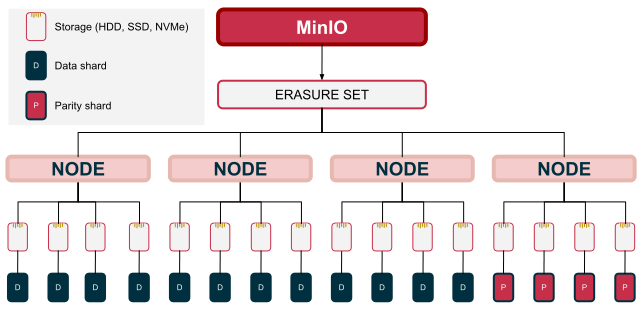
For each write operation, MinIO partitions the object into data and parity shards.
Erasure set stripe size dictates the maximum possible parity of the deployment. The formula for determining the number of data and parity shards to generate is:
N (ERASURE SET SIZE)= K (DATA) + M (PARITY)
The above example deployment has an erasure set of 16 drives.
This can support parity between EC:0 and 1/2 the erasure set drives, or EC:8.
You can set the parity value between 0 and 1/2 the Erasure Set size.
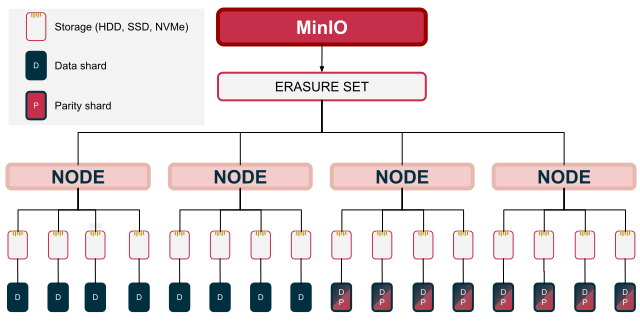
MinIO uses a Reed-Solomon erasure coding implementation and partitions the object for distribution across an erasure set.
The example deployment above has an erasure set size of 16 and a parity of EC:4
Objects written with a given parity settings do not automatically update if you change the parity values later.
MinIO requires a minimum of K shards of any type to read an object.
The value K here constitutes the read quorum for the deployment. The erasure set must therefore have at least K healthy drives in the erasure set to support read operations.
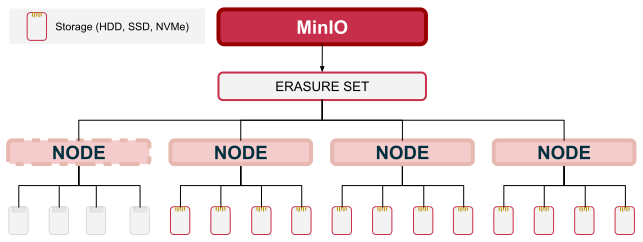
This deployment has one offline node, resulting in only 12 remaining healthy drives.
The object was written with EC:4 with a read quorum of K=12.
This object therefore maintains read quorum and MinIO can reconstruct it for read operations.
MinIO cannot reconstruct an object that has lost read quorum. Such objects may be recovered through other means such as replication resynchronization.
MinIO requires a minimum of K erasure set drives to write an object.
The value K here constitutes the write quorum for the deployment. The erasure set must therefore have at least K available drives online to support write operations.
This deployment has one offline node, resulting in only 12 remaining healthy drives.
A client writes an object with EC:4 parity settings where the erasure set has a write quorum of K=12.
This erasure set maintains write quorum and MinIO can use it for write operations.
If Parity EC:M is exactly 1/2 the erasure set size, write quorum is K+1
This prevents a split-brain type scenario, such as one where a network issue isolates exactly half the erasure set drives from the other.
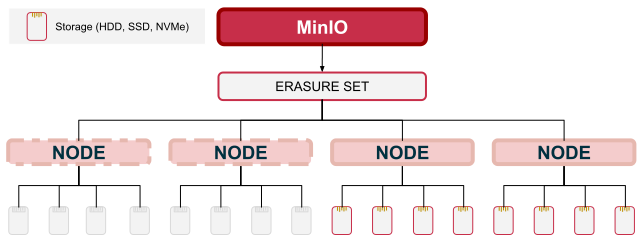
This deployment has two nodes offline due to a transient network failure.
A client writes an object with EC:8 parity settings where the erasure set has a write quorum of K=9.
This erasure set has lost write quorum and MinIO cannot use it for write operations.
The K+1 logic ensures that a client could not potentially write the same object twice - once to each “half” of the erasure set.
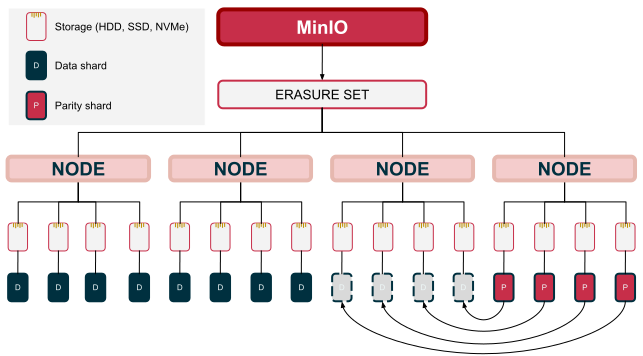
For an object maintaining read quorum, MinIO can use any data or parity shard to heal damaged shards.
An object with EC:4 lost four data shards out of 12 due to drive failures.
Since the object has maintained read quorum, MinIO can heal those lost data shards using the available parity shards.
Use the MinIO Erasure Coding Calculator to explore the possible erasure set size and distributions for your planned topology. Where possible, use an even number of nodes and drives per node to simplify topology planning and conceptualization of drive/erasure-set distribution.
Note
Exclusive access to drives
MinIO requiresexclusive access to the drives or volumes provided for object storage. No other processes, software, scripts, or persons should perform any actions directly on the drives or volumes provided to MinIO or the objects or files MinIO places on them.
Unless directed by MinIO Engineering, do not use scripts or tools to directly modify, delete, or move any of the data shards, parity shards, or metadata files on the provided drives, including from one drive or node to another. Such operations are very likely to result in widespread corruption and data loss beyond MinIO’s ability to heal.
Erasure Parity and Storage Efficiency
Setting the parity for a deployment is a balance between availability and total usable storage. Higher parity values increase resiliency to drive or node failure at the cost of usable storage, while lower parity provides maximum storage with reduced tolerance for drive/node failures. Use the MinIO Erasure Code Calculator to explore the effect of parity on your planned cluster deployment.
The following table lists the outcome of varying erasure code parity levels on a MinIO deployment consisting of 1 node and 16 1TB drives:
Parity
Total Storage
Storage Ratio
Minimum Drives for Read Operations
Minimum Drives for Write Operations
EC: 4 (Default)
12 Tebibytes
0.750
12
12
EC: 6
10 Tebibytes
0.625
10
10
EC: 8
8 Tebibytes
0.500
8
9
Bit Rot Protection
Bit rot is silent data corruption from random changes at the storage media level. For data drives, it is typically the result of decay of the electrical charge or magnetic orientation that represents the data. These sources can range from the small current spike during a power outage to a random cosmic ray resulting in flipped bits. The resulting “bit rot” can cause subtle errors or corruption on the data medium without triggering monitoring tools or hardware.
MinIO’s optimized implementation of the HighwayHash algorithm ensures that it captures and heals corrupted objects on the fly. Integrity is ensured from end to end by computing a hash on READ and verifying it on WRITE from the application, across the network, and to the memory or drive. The implementation is designed for speed and can achieve hashing speeds over 10 GB/sec on a single core on Intel CPUs.
4 - Object Healing
What is healing?
Healing is MinIO’s ability to restore an object that has been damaged, corrupted, or partially lost. The loss can come from multiple types of corruptions or loss, such as but not limited to:
Parity refers to the number of dedicated recovery shards MinIO creates when writing the object. For example, an erasure set may have eight total drives and use three drives during a write for parity. In this scenario, MinIO splits an object into 5 data shards and create 3 parity shards. MinIO distributes these eight shards across the drives in the erasure set. No one drive contains only parity shards or only data shards. Instead, MinIO writes shards for each object in a randomized way to distribute reads evenly across drives.
When MinIO needs to provide the object, it looks for the data shards for the object. If any of the data shards are missing or damaged, MinIO uses one or more of the parity shards to restore the object. When looking for the parity shards, if any of the parity shards are missing or damaged, MinIO restores those as well, provided there are sufficient other shards to serve the object. For this scenario, up to three of data shard parts can be lost or damaged and MinIO can still successfully restore and serve the object.
The number of drives available with intact data or parity shards of the object must meet or exceed the number of drives used for data shards in the erasure set. In the scenario above, five drives with intact shards must be online and available for MinIO to successfully serve the object.
When does MinIO heal an object?
MinIO has a robust system for healing objects.
Healing during GET requests
MinIO automatically checks the consistency of an object’s data shards each time you request an object with a GET or HEAD operation. For versioned buckets, MinIO also checks for consistency during PUT operation.
If all of the data shards are found intact, MinIO serves the object from the data shards without inspecting the corresponding parity shards.
If the object has missing or damaged data shards, MinIO uses the available parity shards to heal the object before serving it as part of the operation. There must be an intact parity shard available for each lost or damaged data shard, otherwise the object cannot be recovered. If any parity shards are lost or damaged, MinIO restores the parity shard, provided there are sufficient other parity shards to serve the object.
Healing with the object scanner
MinIO uses an object scanner to perform a number of tasks related to objects. One of these tasks checks the integrity of objects and, if found damaged or corrupted, heals them.
On each scanning pass, MinIO uses a hash of the object name to select one out of every 1,024 objects to check.
If any object is found to have lost shards, MinIO heals the object from available shards. By default, MinIO does not check for bit rot corruption using the scanner. This can be an expensive operation to perform and the risk of bit rot across multiple disks is low.
Healing by manual request
Administrators can use mc admin heal to initiate a full system healing. The procedure is very resource intensive and not typically needed.
Consult with MinIO Engineers before manually starting a healing process on a deployment.
Healing metrics
MinIO provides several healing metrics to monitor the status of healing processes on a deployment.
Refer to the Metrics and alerts for more information on available endpoints and configuration.
5 - Object Scanner
Overview
MinIO uses the built-in scanner to check objects for healing and to take any scheduled object actions. Such actions may include:
check objects for missing or corrupted data or parity shards and perform healing
The scanner performs these functions at two levels: cluster and bucket. At the cluster level, the scanner splits all buckets into groups and scans one group of buckets at a time. The scanner starts with any new buckets added since the last scan, then randomizes the scanning of other buckets. The scanner completes checks on all bucket groups before starting over with a new set of scans.
At the bucket level, the scanner groups items in buckets and scans selected items from that bucket. The scanner selects objects for a scan based on a hash of the object name. Over a span of 16 scans, MinIO checks every object in the namespace. MinIO fully scans any prefixes known to be new since the last scan.
Scan Length
Multiple factors impact the time it takes for a scan to complete.
Some of these factors include:
Type of drives provided to MinIO
Throughput and iops available
Number and size of objects
Other activity on the MinIO Server
For example, by default, MinIO pauses the scanner to make I/O operations available for read and write requests. This can lengthen the time it takes for a scan to complete.
MinIO waits between each scan by a factor multiplication of the time it takes each scan operation to complete. By default, the value of this factor is 10.0, meaning MinIO waits 10x the length of an operation after one scan completes before starting the next scan. The value of this factor changes depending on the configured scanner speed setting.
Scanner Performance
Many factors impact the scanner performance. Some of these factors include:
available node resources
size of the cluster
number of erasure sets compared to the number of drives
complexity of bucket hierarchy (objects and prefixes).
For example, a cluster that starts with 100TB of data and then grows to 200TB of data may require more time to scan the entire namespace of buckets and objects given the same hardware and workload. Likewise, a single erasure set of 16 drives takes longer to scan than the same number of drives split into two erasure sets of 8 drives each.
MinIO treats the scanner as a background task and pauses it in favor of completing read and write requests on the cluster. As the cluster or workload increases, scanner performance decreases as it yields more frequently to ensure priority of normal S3 operations.
You can adjust how MinIO balances the scanner performance with read/write operations using either the MINIO_SCANNER_SPEED environment variable or the scanner speed configuration setting.
Use mc admin scanner info to see the current status of the scanner and the time since the last full scan. This can help in understanding the metrics provided by the scanner operation.
Scanner metrics, including usage metrics, reflect the last completed scan. PUT or DELETE operations since the last scan do not update in the usage until the next scan of the affected bucket(s).
This page reflects limits and thresholds that apply to MinIO.
Refer to the hardware and software for related recommendations and requirements.
S3 API Limits
Item
Specification
Maximum object size
50 TiB
Minimum object size
0 B
Maximum object size per PUT operation
5 TiB for non-multipart upload 50 TiB for multipart upload
Maximum number of parts per upload
10,000
Part size range
5 MiB to 5 GiB. Last part can be 0 B to 5 GiB
Maximum number of parts returned per list parts request
10,000
Maximum number of objects returned per list objects request
1,000
Maximum number of multipart uploads returned per list multipart uploads request
1,000
Maximum length for bucket names
63
Maximum length for object names
1024
Maximum length for each / separated segment of an object name
255
Maximum number of object versions for a unique object
10000 (Configurable)
Erasure Code Limits
Item
Specification
Maximum number of servers per cluster
no limit
Minimum number of servers
1
Minimum number of drives per server when server count is 1
1 (for SNSD deployments, which do not provide additional reliability or availability)
Minimum number of drives per server when server count is 2 or more
1
Maximum number of drives per server
no limit
Read quorum
N/2
Write quorum
(N/2)+1
Object Name Limitations
Filesystem and Operating System Restrictions
Object Names in MinIO are restricted primarily by the local operating system and filesystem. Windows and some other operating systems restrict file systems with certain special characters, such as ^, *, |, \, /, &, ", or ;.
This list is not exhaustive and may not apply to your operating system and filesystem combination.
On Unix-like operating systems, objects with a path name of ., .., or / return an error of file access denied.
Consult your operating system vendor or filesystem documentation for a comprehensive list for your situation.
MinIO recommends using a Linux operating system with an XFS based filesystem for production workloads.
Conflicting Objects
Applications must assign non-conflicting, unique keys for all objects. This includes avoiding creating objects where the name can collide with that of a parent or sibling object. MinIO returns an empty set for LIST operations at the location of the collision.
For example, the following operations create a namespace conflicts
PUT data/invoices/2024/january/vendors.csv
PUT data/invoices/2024/january <- collides with existing object prefix
PUT data/invoices/2024/january
PUT data/invoices/2024/january/vendors.csv <- collides with existing object
While you can perform GET or HEAD operations against these objects, the name collision causes LIST operations to return an empty result set at the /invoices/2024/january path.