# Enable One-Way Server-Side Bucket Replication
LLMS index: [llms.txt](/llms.txt)
---
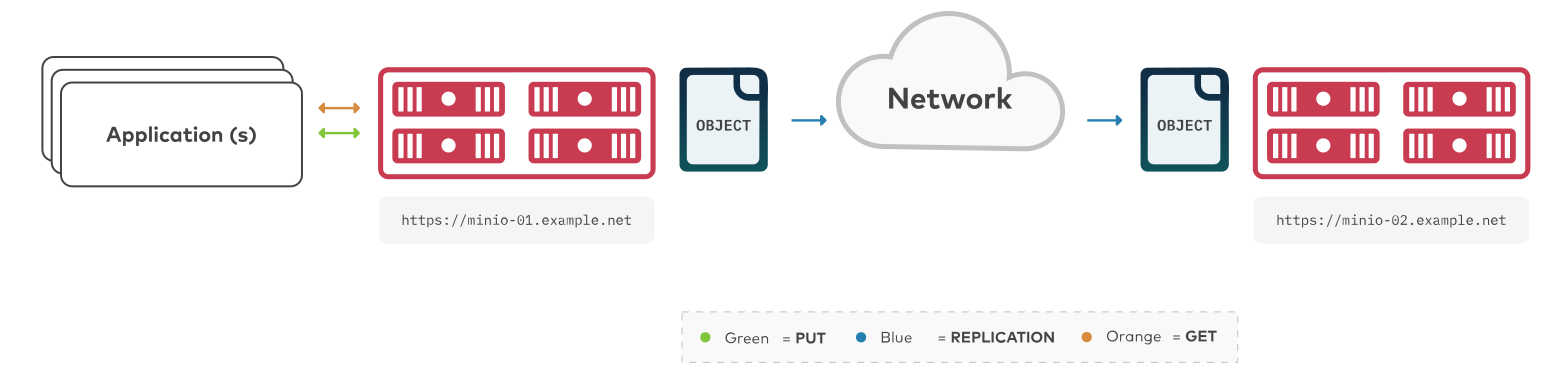
The procedure on this page creates a new bucket replication rule for one-way synchronization of objects from one MinIO bucket to another MinIO bucket. The buckets can be on the same MinIO deployment or on separate MinIO deployments.
 - To configure two-way “active-active” replication between MinIO buckets, see [Enable Two-Way Server-Side Bucket Replication](/administration/bucket-replication/enable-server-side-two-way-bucket-replication/#minio-bucket-replication-serverside-twoway).
- To configure multi-site “active-active” replication between MinIO deployments, see [Enable Multi-Site Server-Side Bucket Replication](/administration/bucket-replication/enable-server-side-multi-site-bucket-replication/#minio-bucket-replication-serverside-multi)
> [!NOTE]
> **Note**
>
> To configure replication between arbitrary S3-compatible services (not necessarily MinIO), use [`mc mirror`](/reference/minio-mc/mc-mirror/#command-mc.mirror).
## Requirements {#requirements}
Replication requires all participating clusters meet the [following requirements](/administration/bucket-replication/bucket-replication-requirements/#minio-bucket-replication-requirements). This procedure assumes you have reviewed and validated those requirements.
For more details, see the [Bucket Replication Requirements](/administration/bucket-replication/bucket-replication-requirements/#minio-bucket-replication-requirements) page.
## Considerations {#considerations}
Click to expand any of the following:
> [!DETAILS]- Replication of Existing Objects
> MinIO supports automatically replicating existing objects in a bucket.
>
> MinIO requires explicitly enabling replication of existing objects using the [`mc replicate add --replicate`](/reference/minio-mc/mc-replicate-add/#mc.replicate.add.-replicate) or [`mc replicate update --replicate`](/reference/minio-mc/mc-replicate-update/#mc.replicate.update.-replicate) and including the `existing-objects` replication feature flag. This procedure includes the required flags for enabling replication of existing objects.
> [!DETAILS]- Replication of Delete Operations
> MinIO supports replicating S3 `DELETE` operations onto the target bucket. Specifically, MinIO can replicate versioning [Delete Markers](https://docs.aws.amazon.com/AmazonS3/latest/userguide/versioning-workflows.html) and the deletion of specific versioned objects:
>
> - For delete operations on an object, MinIO replication also creates the delete marker on the target bucket.
> - For delete operations on versions of an object, MinIO replication also deletes those versions on the target bucket.
>
> MinIO requires explicitly enabling replication of delete operations using the [`mc replicate add --replicate`](/reference/minio-mc/mc-replicate-add/#mc.replicate.add.-replicate) or [`mc replicate update --replicate`](/reference/minio-mc/mc-replicate-update/#mc.replicate.update.-replicate). This procedure includes the required flags for enabling replication of delete operations and delete markers.
>
> MinIO does *not* replicate delete operations resulting from the application of [lifecycle management expiration rules](/administration/object-management/object-lifecycle-management/#minio-lifecycle-management-expiration).
>
> See [Replication of Delete Operations](/administration/bucket-replication/#minio-replication-behavior-delete) and [Object Deletion](/administration/object-management/object-delete/#minio-object-delete) for more complete documentation.
> [!DETAILS]- Multi-Site Replication
> MinIO supports configuring multiple remote targets per bucket or bucket prefix. For example, you can configure a bucket to replicate data to two or more remote MinIO deployments, where one deployment is a 1:1 copy (replication of all operations including deletions) and another is a full historical record (replication of only non-destructive write operations).
>
> This procedure documents one-way replication to a single remote MinIO deployment. You can repeat this tutorial to replicate a single bucket to multiple remote targets.
## Procedure {#procedure}
- **[Configure One-Way Bucket Replication Using the Command Line](#minio-bucket-replication-one-way-minio-cli-procedure)**
> - [Create a Replication Remote Target](#minio-bucket-replication-one-way-minio-cli-create-remote-targets)
> - [Create a New Bucket Replication Rule](#minio-bucket-replication-one-way-minio-cli-create-replication-rules)
> - [Validate the Replication Configuration](#minio-bucket-replication-one-way-minio-cli-verify-replication-config)
### Configure One-Way Bucket Replication Using the Command Line `mc` {#configure-one-way-bucket-replication-using-the-command-line-mc}
This procedure uses the [aliases](/reference/minio-mc/mc-alias-set/#alias) `SOURCE` and `REMOTE` to reference each MinIO deployment being configured for replication. Replace these values with the appropriate alias for your target MinIO deployments.
This procedure assumes each alias corresponds to a user with the [necessary replication permissions](/administration/bucket-replication/bucket-replication-requirements/#minio-bucket-replication-serverside-oneway-permissions).
> [!NOTE]
> **Changed: RELEASE.2022-12-24T15-21-38Z**
>
> [`mc replicate add`](/reference/minio-mc/mc-replicate-add/#command-mc.replicate.add) automatically creates the necessary replication targets, removing the need for using the deprecated `mc admin remote bucket add` command. This procedure only documents the procedure as of that release.
#### 1) Create a New Bucket Replication Rule {#create-a-new-bucket-replication-rule}
Use the [`mc replicate add`](/reference/minio-mc/mc-replicate-add/#command-mc.replicate.add) command to add a new replication rule to each MinIO deployment.
```shell
mc replicate add ALIAS/BUCKET \
--remote-bucket 'https://USER:PASSWORD@HOSTNAME:PORT/BUCKET' \
--replicate "delete,delete-marker,existing-objects"
```
- Replace `ALIAS` with the [alias](/reference/minio-mc/mc-alias-set/#alias) of the origin MinIO deployment. The name *must* match the bucket specified when creating the remote target in the previous step.
- Replace `BUCKET` with the name of the bucket to replicate from on the origin deployment.
- Replace the `--remote-bucket` to specify the remote MinIO deployment and bucket to which the `ALIAS/BUCKET` replicates.
The `USER:PASSWORD` must correspond to a user on the remote deployment with the [necessary replication permissions](/administration/bucket-replication/enable-server-side-two-way-bucket-replication/#minio-bucket-replication-serverside-twoway-permissions).
The `HOSTNAME:PORT` must resolve to a reachable MinIO instance on the remote deployment. The `BUCKET` must exist and otherwise meet all other [replication requirements](/administration/bucket-replication/bucket-replication-requirements/#minio-bucket-replication-requirements).
- The `--replicate "delete,delete-marker,existing-objects"` flag enables the following replication features:
- [Replication of Deletes](/administration/bucket-replication/#minio-replication-behavior-delete)
- [Replication of existing Objects](/administration/bucket-replication/#minio-replication-behavior-existing-objects)
See [`mc replicate add --replicate`](/reference/minio-mc/mc-replicate-add/#mc.replicate.add.-replicate) for more complete documentation. Omit any field to disable replication of that component.
Specify any other supported optional arguments for [`mc replicate add`](/reference/minio-mc/mc-replicate-add/#command-mc.replicate.add).
#### 2) Validate the Replication Configuration {#validate-the-replication-configuration}
Use [`mc cp`](/reference/minio-mc/mc-cp/#command-mc.cp) to copy a new object to the replicated bucket on one of the deployments.
```shell
mc cp ~/foo.txt ALIAS/BUCKET
```
Use [`mc ls`](/reference/minio-mc/mc-ls/#command-mc.ls) to verify the object exists on the destination bucket:
```shell
mc ls ALIAS/BUCKET
```
> [!NOTE]
> **See also**
>
> - Use the [`mc replicate update`](/reference/minio-mc/mc-replicate-update/#command-mc.replicate.update) command to modify an existing replication rule.
> - Use the [`mc replicate update`](/reference/minio-mc/mc-replicate-update/#command-mc.replicate.update) command with the [`--state "disable"`](/reference/minio-mc/mc-replicate-update/#mc.replicate.update.-state) flag to disable an existing replication rule.
> - Use the [`mc replicate rm`](/reference/minio-mc/mc-replicate-rm/#command-mc.replicate.rm) command to remove an existing replication rule.
- To configure two-way “active-active” replication between MinIO buckets, see [Enable Two-Way Server-Side Bucket Replication](/administration/bucket-replication/enable-server-side-two-way-bucket-replication/#minio-bucket-replication-serverside-twoway).
- To configure multi-site “active-active” replication between MinIO deployments, see [Enable Multi-Site Server-Side Bucket Replication](/administration/bucket-replication/enable-server-side-multi-site-bucket-replication/#minio-bucket-replication-serverside-multi)
> [!NOTE]
> **Note**
>
> To configure replication between arbitrary S3-compatible services (not necessarily MinIO), use [`mc mirror`](/reference/minio-mc/mc-mirror/#command-mc.mirror).
## Requirements {#requirements}
Replication requires all participating clusters meet the [following requirements](/administration/bucket-replication/bucket-replication-requirements/#minio-bucket-replication-requirements). This procedure assumes you have reviewed and validated those requirements.
For more details, see the [Bucket Replication Requirements](/administration/bucket-replication/bucket-replication-requirements/#minio-bucket-replication-requirements) page.
## Considerations {#considerations}
Click to expand any of the following:
> [!DETAILS]- Replication of Existing Objects
> MinIO supports automatically replicating existing objects in a bucket.
>
> MinIO requires explicitly enabling replication of existing objects using the [`mc replicate add --replicate`](/reference/minio-mc/mc-replicate-add/#mc.replicate.add.-replicate) or [`mc replicate update --replicate`](/reference/minio-mc/mc-replicate-update/#mc.replicate.update.-replicate) and including the `existing-objects` replication feature flag. This procedure includes the required flags for enabling replication of existing objects.
> [!DETAILS]- Replication of Delete Operations
> MinIO supports replicating S3 `DELETE` operations onto the target bucket. Specifically, MinIO can replicate versioning [Delete Markers](https://docs.aws.amazon.com/AmazonS3/latest/userguide/versioning-workflows.html) and the deletion of specific versioned objects:
>
> - For delete operations on an object, MinIO replication also creates the delete marker on the target bucket.
> - For delete operations on versions of an object, MinIO replication also deletes those versions on the target bucket.
>
> MinIO requires explicitly enabling replication of delete operations using the [`mc replicate add --replicate`](/reference/minio-mc/mc-replicate-add/#mc.replicate.add.-replicate) or [`mc replicate update --replicate`](/reference/minio-mc/mc-replicate-update/#mc.replicate.update.-replicate). This procedure includes the required flags for enabling replication of delete operations and delete markers.
>
> MinIO does *not* replicate delete operations resulting from the application of [lifecycle management expiration rules](/administration/object-management/object-lifecycle-management/#minio-lifecycle-management-expiration).
>
> See [Replication of Delete Operations](/administration/bucket-replication/#minio-replication-behavior-delete) and [Object Deletion](/administration/object-management/object-delete/#minio-object-delete) for more complete documentation.
> [!DETAILS]- Multi-Site Replication
> MinIO supports configuring multiple remote targets per bucket or bucket prefix. For example, you can configure a bucket to replicate data to two or more remote MinIO deployments, where one deployment is a 1:1 copy (replication of all operations including deletions) and another is a full historical record (replication of only non-destructive write operations).
>
> This procedure documents one-way replication to a single remote MinIO deployment. You can repeat this tutorial to replicate a single bucket to multiple remote targets.
## Procedure {#procedure}
- **[Configure One-Way Bucket Replication Using the Command Line](#minio-bucket-replication-one-way-minio-cli-procedure)**
> - [Create a Replication Remote Target](#minio-bucket-replication-one-way-minio-cli-create-remote-targets)
> - [Create a New Bucket Replication Rule](#minio-bucket-replication-one-way-minio-cli-create-replication-rules)
> - [Validate the Replication Configuration](#minio-bucket-replication-one-way-minio-cli-verify-replication-config)
### Configure One-Way Bucket Replication Using the Command Line `mc` {#configure-one-way-bucket-replication-using-the-command-line-mc}
This procedure uses the [aliases](/reference/minio-mc/mc-alias-set/#alias) `SOURCE` and `REMOTE` to reference each MinIO deployment being configured for replication. Replace these values with the appropriate alias for your target MinIO deployments.
This procedure assumes each alias corresponds to a user with the [necessary replication permissions](/administration/bucket-replication/bucket-replication-requirements/#minio-bucket-replication-serverside-oneway-permissions).
> [!NOTE]
> **Changed: RELEASE.2022-12-24T15-21-38Z**
>
> [`mc replicate add`](/reference/minio-mc/mc-replicate-add/#command-mc.replicate.add) automatically creates the necessary replication targets, removing the need for using the deprecated `mc admin remote bucket add` command. This procedure only documents the procedure as of that release.
#### 1) Create a New Bucket Replication Rule {#create-a-new-bucket-replication-rule}
Use the [`mc replicate add`](/reference/minio-mc/mc-replicate-add/#command-mc.replicate.add) command to add a new replication rule to each MinIO deployment.
```shell
mc replicate add ALIAS/BUCKET \
--remote-bucket 'https://USER:PASSWORD@HOSTNAME:PORT/BUCKET' \
--replicate "delete,delete-marker,existing-objects"
```
- Replace `ALIAS` with the [alias](/reference/minio-mc/mc-alias-set/#alias) of the origin MinIO deployment. The name *must* match the bucket specified when creating the remote target in the previous step.
- Replace `BUCKET` with the name of the bucket to replicate from on the origin deployment.
- Replace the `--remote-bucket` to specify the remote MinIO deployment and bucket to which the `ALIAS/BUCKET` replicates.
The `USER:PASSWORD` must correspond to a user on the remote deployment with the [necessary replication permissions](/administration/bucket-replication/enable-server-side-two-way-bucket-replication/#minio-bucket-replication-serverside-twoway-permissions).
The `HOSTNAME:PORT` must resolve to a reachable MinIO instance on the remote deployment. The `BUCKET` must exist and otherwise meet all other [replication requirements](/administration/bucket-replication/bucket-replication-requirements/#minio-bucket-replication-requirements).
- The `--replicate "delete,delete-marker,existing-objects"` flag enables the following replication features:
- [Replication of Deletes](/administration/bucket-replication/#minio-replication-behavior-delete)
- [Replication of existing Objects](/administration/bucket-replication/#minio-replication-behavior-existing-objects)
See [`mc replicate add --replicate`](/reference/minio-mc/mc-replicate-add/#mc.replicate.add.-replicate) for more complete documentation. Omit any field to disable replication of that component.
Specify any other supported optional arguments for [`mc replicate add`](/reference/minio-mc/mc-replicate-add/#command-mc.replicate.add).
#### 2) Validate the Replication Configuration {#validate-the-replication-configuration}
Use [`mc cp`](/reference/minio-mc/mc-cp/#command-mc.cp) to copy a new object to the replicated bucket on one of the deployments.
```shell
mc cp ~/foo.txt ALIAS/BUCKET
```
Use [`mc ls`](/reference/minio-mc/mc-ls/#command-mc.ls) to verify the object exists on the destination bucket:
```shell
mc ls ALIAS/BUCKET
```
> [!NOTE]
> **See also**
>
> - Use the [`mc replicate update`](/reference/minio-mc/mc-replicate-update/#command-mc.replicate.update) command to modify an existing replication rule.
> - Use the [`mc replicate update`](/reference/minio-mc/mc-replicate-update/#command-mc.replicate.update) command with the [`--state "disable"`](/reference/minio-mc/mc-replicate-update/#mc.replicate.update.-state) flag to disable an existing replication rule.
> - Use the [`mc replicate rm`](/reference/minio-mc/mc-replicate-rm/#command-mc.replicate.rm) command to remove an existing replication rule.